Average Reaction Time: What Your Result Means and How to Test Fairly
After trying a reaction time test, most people want to know one thing: is my result good? The honest answer is that it depends on what kind of test you took, the device you used and how you took it. A number from a phone test cannot be compared directly with a number from a lab or a race start.
This guide explains what reaction time is, the typical range for simple visual tests, why results vary so much, and how to test yourself fairly so your numbers are comparable. It ends with how to measure it in Reflexes Test.
What reaction time measures
Reaction time is the delay between something happening and you responding to it. In a simple reaction test there is one signal and one response: the screen changes colour, you tap. Your eyes detect the change, your brain processes it, and a signal travels to the muscles in your hand.
Choice reaction tests, where you must decide between responses, take longer, because deciding takes time. Real-world reactions, such as braking in a car, take longer still, because they include noticing a hazard, deciding what to do and moving a foot. That is why figures quoted for drivers are much longer than figures from a tap-the-screen test.
What is a typical result?
For simple visual tests, results are commonly reported in the region of 200 to 300 milliseconds (ms), meaning a fifth to a third of a second. Online and phone tests often read a little higher than lab measurements, because the device itself adds a delay before the colour change appears and before your tap is registered.
Treat any average as a rough reference, not a target. What matters more is your own typical result on the same device, measured the same way each time.
A reaction time test is a casual game, not a medical or fitness assessment. If you notice sudden or unexplained changes in your reactions, coordination, vision or alertness, speak to a doctor.
What makes results vary
Your device
Screens take time to update, and touchscreens, mice and browsers add their own delays. A slow display or a busy device can add tens of milliseconds. Results from different devices are not directly comparable.
Attention and tiredness
Being sleepy, distracted or bored slows reactions and makes them more variable. Many people notice slower results late at night.
Practice and warm-up
The first few attempts are often slower as you get used to the test. Results usually settle after a handful of rounds.
Age
Reaction times generally tend to lengthen gradually with age, though individuals vary widely.
Anticipation
If a test changes at a predictable moment, you can tap by timing rather than reacting, which gives an unrealistically fast result. Good tests use a random delay and reject early taps.
How to test your reaction time fairly
- Use the same device, browser and position each time.
- Close other apps or tabs that might slow the device.
- Sit comfortably with your finger or mouse ready, but not pressing.
- Do two or three warm-up rounds and ignore them.
- Take five to ten rounds and write them down.
- Use the middle value (median) or the average of the rounds, not your single best.
- Discard rounds where you were obviously distracted, and do not count early taps.
Comparing ways to measure reaction time
The ruler drop test
A partner holds a ruler, drops it without warning, and you catch it; the distance it fell converts to time. It needs no device, so there is no screen lag, but it needs a partner and is hard to read precisely.
Screen-based tests
Quick, repeatable and easy to compare over time on one device. Device delay is built into every result, so they are best for tracking your own changes or friendly competition on the same phone.
Lab equipment
Specialised equipment controls timing very precisely. It is used in research, not something most people have access to.
Measuring your reaction time with Reflexes Test
Reflexes Test is a simple screen-based test with a random delay.
- Press Start. The whole screen turns red.
- Wait. The screen stays red for a random time between one and five seconds.
- When it turns green and says "Tap now!", tap anywhere on the screen, or click with a mouse.
- Read your result in milliseconds on the blue screen.
- If you tap while the screen is still red, it turns orange with "Too early!" and no time is recorded.
- Tap the screen or press Start to go again. Write down several results and use your typical one.
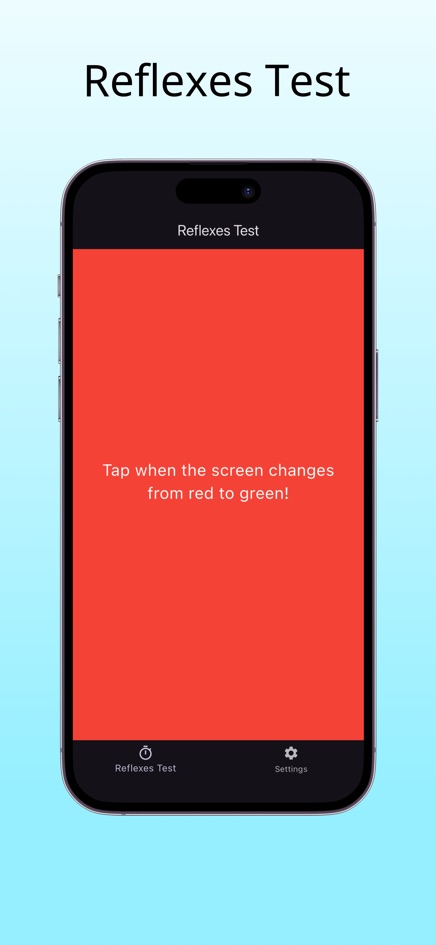
Results are not saved, so keep your own list if you want to compare over time. The share button sends a link so friends can try. Reflexes Test is also available for iPhone and Android. To work on your times, see how to improve reaction time.
Frequently asked questions
What is the average human reaction time?
For simple visual tests, results are commonly reported around 200 to 300 milliseconds. Device lag, tiredness and the type of test all shift the number.
Is 300 ms a slow reaction time?
On a phone or browser test, results around that level are common. Compare against your own results on the same device rather than against other people's devices.
Why are my results different on my phone and my computer?
Each screen, touch sensor, mouse and browser adds a different delay. Only compare results from the same device.
Why is my first try always slow?
You are still getting used to the test. Do a few warm-up rounds and leave them out.
Does Reflexes Test keep a history of my scores?
No. Each result is shown until the next round, so note down any scores you want to keep.