Car Maintenance Schedule by Mileage or Time: How to Read and Follow Yours
Every car comes with a maintenance schedule: a list of jobs and the interval for each, such as an oil change or a tire rotation. The intervals are almost always given as a distance and a time, with the instruction to do the job at whichever comes first.
This guide explains how to read your schedule, why time matters even if you drive very little, what the "severe" or "special operating conditions" schedule means, and how to turn it all into reminders. It compares ways to keep on top of the schedule, then shows how to set it up in CarLog.
Where to find your car's schedule
The authoritative schedule is the one from your vehicle's manufacturer. Look in:
- The owner's manual or a separate maintenance or warranty booklet.
- The manufacturer's website or owner app, which often lists the schedule for your model and year.
- The car's maintenance reminder system, if it has one, which may show the next service on the dashboard.
- Your dealer's or mechanic's service records, which usually note the next recommended service.
Generic charts online are useful for understanding the kinds of jobs involved, but intervals differ a lot between makes, engines and model years. Follow the one for your car.
Mileage or time: whichever comes first
A schedule entry might say something like "every X miles or Y months, whichever comes first". Both limits matter:
- Mileage reflects wear from driving: engine running time, tire wear, brake use.
- Time reflects ageing that happens even when the car is parked. Fluids break down, rubber parts dry out and batteries lose capacity.
If you drive a lot, you will usually hit the mileage limit first. If you drive little, the time limit will usually come first, and it is easy to miss because the odometer barely moves. That is the most common reason low-mileage cars fall behind on maintenance.
The kinds of jobs on a typical schedule
Schedules differ, but most include some version of these, each with its own interval in your manual:
- Engine oil and filter change.
- Tire rotation, plus regular checks of tire pressure and tread.
- Engine air filter and cabin air filter.
- Brake inspection, and brake fluid replacement at longer intervals.
- Coolant, transmission fluid and other fluids, often at long intervals.
- Spark plugs on petrol engines, at long intervals.
- Battery checks, especially as the battery ages.
- Wiper blades and lights.
- Any official inspection required where you live.
Electric vehicles have shorter lists, since there is no engine oil or spark plugs, but still include tires, brakes, cabin filters and coolant for the battery system on many models.
Normal vs severe service schedules
Many manuals give two schedules: a normal one and one for severe or special operating conditions, with shorter intervals. Conditions often listed include mostly short trips, stop-and-go traffic, very hot or cold climates, dusty or unpaved roads, towing, and long idling. Read your manual's definitions; a lot of everyday city driving can fall into the severe category. If you are not sure which applies, ask your dealer or mechanic.
Turning the schedule into reminders
- List the jobs from your manual that apply to your car and your driving conditions.
- For each job, find the date and odometer reading when it was last done, from receipts or service stickers.
- Add the interval to both: last date plus the time interval gives a due date; last mileage plus the distance interval gives a due mileage.
- Set a reminder for the due date, ideally a few weeks early.
- Check the odometer regularly against the due mileages.
- After each service, record it and set the next due date and mileage straight away.
Dashboard reminder, calendar, spreadsheet or app?
The car's own reminder
Convenient when it exists, but it usually covers only oil or general service, needs resetting after each job, and does not keep a history.
Calendar reminders
Easy for date-based intervals. Calendars know nothing about mileage, though, and they do not record what was done or what it cost.
Spreadsheet
Can hold the whole schedule with last-done and next-due columns and formulas. It will not remind you unless you remember to open it.
Maintenance app
Combines reminders by date and mileage with the service history and costs. It still relies on you to enter your odometer readings and records. Our guide on how to keep track of car maintenance covers the record-keeping side.
How to set up your schedule in CarLog
In CarLog, each schedule item becomes a reminder with a date and, optionally, a mileage:
- Add your vehicle with its current mileage.
- Enter past services you know about with Add Maintenance Record, including the date, mileage and cost.
- In Reminders, add one per job: oil change, tire change, battery change, vehicle inspection or other. Set the due date and the due mileage from your manual's interval.
- Watch the status: reminders due within 30 days show Due Soon, and ones past their date show Overdue.
- When the work is done, mark the reminder Complete, add the maintenance record, and create the next reminder.
- Review the Statistics tab to see what maintenance costs per month, per year and by type.
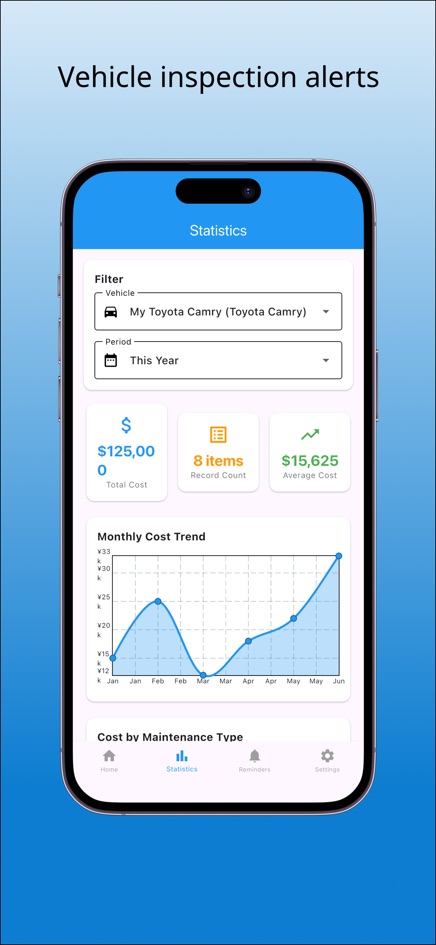
The phone apps for iPhone and Android can send reminder notifications; the web version shows status on the page only.
Frequently asked questions
Should I follow mileage or time for maintenance?
Both. Most schedules say to do each job at the mileage or the time limit, whichever comes first.
I barely drive. Do I still need regular oil changes?
Usually yes, by the time limit in your manual, because oil and other parts age even when the car is parked. Check your manual for the exact interval.
What counts as severe driving conditions?
Each manual defines it, but common examples are mostly short trips, stop-and-go traffic, extreme temperatures, dusty roads and towing. If they apply, follow the shorter schedule.
Can CarLog remind me by mileage?
You can set a due mileage on a reminder alongside the due date. The app does not read your car's odometer automatically, so compare the due mileage with your dashboard now and then.
Can I export my maintenance history?
Yes. Data Export downloads a CSV file that opens in any spreadsheet app.