How to Keep Track of Car Maintenance: A Simple System That Works
Most people know their car needs regular oil changes, tire work and inspections. Fewer can say when each was last done. Without records, it is easy to miss a service, pay for one twice, or struggle to prove a car's history when you sell it.
Keeping track does not need to be complicated. This guide sets out a simple system: what to record each time, how to know when the next job is due, how to organise receipts, and the honest pros and cons of a paper logbook, a spreadsheet and an app. It ends with how to set it up in CarLog.
Step 1: Gather what you already have
Start with the information you can find today:
- The owner's manual or maintenance guide for your vehicle, which lists the recommended service intervals.
- Receipts and invoices from previous services, in the glovebox, a drawer or your email.
- Stickers on the windshield or door frame from the last oil change.
- Your car's basic details: make, model, year, license plate and current odometer reading. The VIN is useful for parts orders and recalls.
You do not need a complete history to begin. Record what you can find, and keep everything from today on.
Step 2: Record every service the same way
For each piece of work, whether done by a shop or by you, note:
- Date.
- Odometer reading at the time.
- What was done: oil change, tire rotation or replacement, battery, brakes, inspection, and so on.
- Cost, including parts and labour.
- Where it was done: the shop's name or "at home".
- Details worth remembering: oil grade, tire size, part numbers, warranty terms, or anything the mechanic recommended for later.
Consistency matters more than detail. A short, complete record of every service is more useful than a detailed record of only some of them.
Step 3: Know when the next job is due
Most maintenance is due by time or by distance, whichever comes first. After each service, work out when the next one is due using your owner's manual or the shop's recommendation, and write down both:
- The due date, such as twelve months from today.
- The due mileage, such as the current odometer reading plus the interval in your manual.
- A reminder a few weeks before the due date, so you have time to book.
- Separate reminders for things on their own cycle, such as an annual inspection, registration renewal or a battery that is getting old.
Check your odometer against the due mileage now and then, especially before long trips. For help reading your manual's intervals, see our guide to a car maintenance schedule by mileage or time.
Step 4: Keep receipts where you can find them
Receipts back up your records for warranty claims and resale. Pick one place and stick to it: an envelope or folder in the house, a folder in your email, or photos on your phone. Note the date and mileage on each one so it matches the log.
Step 5: Review your costs once a year
Adding up a year of maintenance tells you what the car really costs to keep running, helps you budget for next year and can inform the decision to repair or replace an older vehicle. Look at the total, the biggest single jobs and which types of work cost the most.
Logbook, spreadsheet or app?
Paper logbook
A small notebook in the glovebox is simple and always with the car, and many buyers like seeing a handwritten service history. It cannot remind you when something is due, it is easy to lose, and totals need a calculator.
Spreadsheet
Good for totals and sorting, and easy to back up. It is less convenient to update at the shop counter on a phone, and reminders mean setting calendar events separately.
Car maintenance app
Records, reminders and cost totals live in one place on your phone. The downside is that the data depends on the app and the device, so look for one that can export your records.
How to keep track of car maintenance in CarLog
CarLog follows the steps above:
- Tap Add Vehicle and enter a name, manufacturer, model, year, license plate and current mileage, plus the VIN if you like. Add every vehicle you look after.
- Choose Add Maintenance Record, pick the vehicle and type, and enter the date, mileage, cost, place and a memo for details such as oil grade or tire size.
- Open Reminders and add one for an oil change, tire change, battery change, vehicle inspection or anything else, with a due date and an optional due mileage.
- Check the reminder list: items due within 30 days show Due Soon and missed ones show Overdue. Mark a reminder Complete when the job is done.
- Open a vehicle to see its maintenance timeline, and use the Statistics tab for total and average cost, a monthly trend and cost by type.
- Use Data Export to download a CSV of your history as a backup or for a spreadsheet.
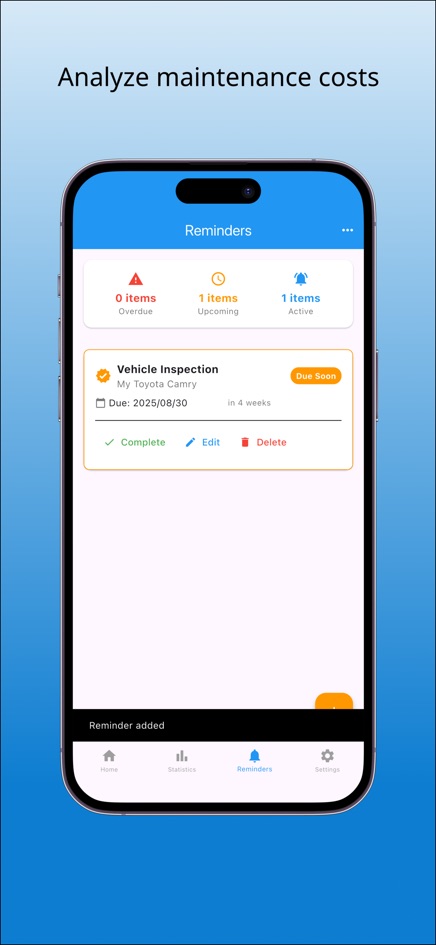
The web version shows reminder status on the page but cannot send notifications. The iPhone and Android apps add reminder notifications and let you attach receipt photos to records.
Frequently asked questions
What is the easiest way to keep track of car maintenance?
Record every service with the date, mileage, work done and cost, and set a reminder for the next one by both date and mileage. A notebook, spreadsheet or app all work if you use them every time.
Do I need to keep car maintenance receipts?
It is a good idea. Receipts support warranty claims and show buyers that the car was maintained. Keep them in one place and note the date and mileage on each.
Can I track more than one car in CarLog?
Yes. Add as many vehicles as you like, including motorcycles or a family member's car, and view records and statistics per vehicle.
Does CarLog use miles or kilometres?
Mileage is entered as a number and labelled in kilometres in the app. If you use miles, enter your odometer reading in miles consistently so due mileages still compare correctly.
Will the web version notify me when maintenance is due?
No. It shows Due Soon and Overdue on the page. The phone apps can send notifications.