How to Add a Date Stamp to iPhone Photos
Old film compact cameras printed the date in the corner of every picture. The iPhone camera does not offer that option: the date and time are saved inside each photo file, but nothing appears on the image itself. That is a problem when you print photos, send them through apps that strip hidden data, or need the date visible for a record.
This guide explains where the iPhone keeps the date, how to check and correct it, how to add a date by hand with built-in tools, and how to stamp a whole batch of photos at once with each photo's own date.
Where your iPhone stores the date
Every photo your iPhone takes carries metadata, often called EXIF data, which includes the date and time it was taken. In the Photos app, open a photo and swipe up, or tap the info (i) button, to see it along with the camera details and, if location was on, the place.
This hidden date is reliable for photos taken with the camera, but it can be lost. Screenshots of photos, pictures saved from social networks or messaging apps, and some edited exports may have no original date, or the date you saved them instead.
Check and correct the date first
A stamp is only useful if the date is right. If a photo shows the wrong date, for example a picture from a camera whose clock was never set, or a scan of an old print, you can change it in Photos:
- Open the photo and swipe up or tap the info button.
- Tap Adjust next to the date.
- Set the correct date and time, and tap Adjust to save.
This changes the date your library uses for sorting. It is worth doing before stamping, so the stamp and the library agree.
Option 1: Type the date with Markup
For one or two photos, the built-in Markup tool can put text on the picture:
- Open the photo in Photos and tap Edit.
- Tap the Markup (pen) button.
- Tap the + button and choose Text.
- Type the date, then use the format controls to change the size and color, and drag the text box to a corner.
- Tap Done to save.
Limitations: you have to type every date yourself and position each one by hand, so it is slow for more than a few photos, and the style is hard to keep consistent. Menu names can differ slightly between iOS versions.
Option 2: Print services and editing apps
Some photo printing services and kiosks offer a date-printing option at order time, which adds the date to the print but not to your digital copy. General photo editors with a text tool work like Markup: flexible, but one photo at a time and with dates typed by hand.
Option 3: Stamp many photos at once with an app
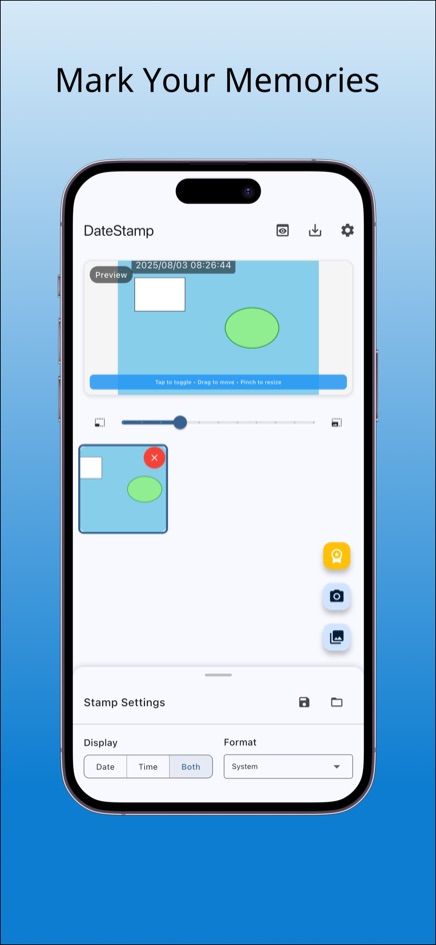
A dedicated date stamp app reads the date from each photo's metadata and prints it automatically, so a batch from a two-week trip gets the right date on every picture without typing. Here is how it works in DateStamp:
- Open DateStamp and tap Gallery to choose up to 30 photos, or Camera to take a new one. JPEG, PNG and HEIF photos are supported, which covers what the iPhone camera produces.
- In Stamp Settings, choose to show the Date, the Time or Both, and pick a format such as ISO (2025-08-01), US (08/01/2025), EU (01/08/2025) or the system format.
- Choose one of nine positions. In the preview you can also drag the stamp to move it and pinch to resize it.
- Pick small, medium or large text, white, black or auto-contrast color, the opacity, and bold if you want it.
- Save the combination as a preset if you will use it again; up to five presets are kept.
- Check the preview, swipe to compare the original with the stamped version, then save. The original photos stay as they were.
DateStamp is on the App Store for iPhone, on Google Play for Android, and free in the browser, where photos are processed on your device and never uploaded.
Which option should you use?
- One photo, any custom text: Markup.
- Prints only, digital copies untouched: a print service with a date option.
- Many photos, each with its own correct date: a batch date stamp app.
- Photos with no original date, such as scans: correct the date in Photos first, or use a custom date in the app.
Tips for a good-looking date stamp
- The classic look is small text in the bottom-right corner. Keep it small so it does not compete with the picture.
- Use a color that contrasts with that corner: white disappears against sky or snow, black against shadows. Auto contrast handles this for you.
- Use the year-first ISO format for records and for photos shared between countries, since 08/01 means August 1 in the US and 8 January in much of Europe.
- Move the stamp if a face or important detail sits in that corner.
- Keep the unstamped originals. A stamp becomes part of the image and cannot be removed cleanly later.
Frequently asked questions
Can the iPhone camera add a date stamp automatically?
Not with a built-in setting. The date is saved in the photo's metadata, and you need Markup, an editor or a date stamp app to make it visible on the image.
Why does a photo show the wrong date?
The photo may have lost its original metadata, for example if it was saved from a messaging app or is a screenshot. Correct it with Adjust in the Photos info panel, or use a custom date in DateStamp.
Does adding a date stamp change my original photo?
With DateStamp, no: it saves a new stamped copy. With Markup, the edit is applied to the photo, though Photos lets you revert edits later.
Can I stamp photos on a computer instead?
Yes. The web version of DateStamp works in a desktop browser too, and downloads the stamped copies as files.