Eisenhower Matrix Examples for Work, School and Home
The Eisenhower Matrix sorts tasks with two questions: is it urgent, and is it important? The answers put every task in one of four boxes, and each box comes with a default action. The idea is easy to explain, but most people only see how it works when they look at a filled-in example.
Below are realistic example matrices for an office job, a team lead, a student and a household, followed by how to handle tasks that seem to belong in two boxes, an honest look at paper versus apps, and how to set one up in a phone app.
The four quadrants in one minute
- Urgent and important: do it now. Real deadlines, problems that get worse if left, commitments due today.
- Not urgent but important: schedule it. Planning, learning, health, relationships, and work that prevents future emergencies.
- Urgent but not important: delegate, batch or shorten it. Interruptions and requests that matter more to someone else's timeline than to your goals.
- Neither urgent nor important: drop it, or keep it as a deliberate break.
Important means it moves you toward a goal you care about. Urgent means it has a near deadline or demands attention now. The point of the matrix is to stop the second from crowding out the first.
Example 1: An office job
- Urgent and important: finish the client report due at 3 pm; fix the invoice error a customer reported this morning.
- Not urgent but important: prepare for next month's performance review; learn the new reporting tool; tidy the shared project folder so handovers are easier.
- Urgent but not important: reply to a vendor's routine scheduling email; join a status call where you only need to listen; find a document a colleague could locate themselves.
- Neither: reorganizing your inbox labels again; reading an industry newsletter you never act on.
Notice that the second quadrant contains the tasks that would make next month easier. They will never feel urgent until they become emergencies, which is exactly why they need a slot in the calendar.
Example 2: A team lead or manager
- Urgent and important: unblock a team member stuck on a release; approve the budget due to finance today.
- Not urgent but important: one-to-one meetings; hiring plan for next quarter; writing down processes only you know.
- Urgent but not important: compiling a weekly spreadsheet someone else could own; answering questions already covered in the team wiki.
- Neither: attending meetings out of habit where you add nothing.
For managers, the third quadrant is where delegation pays off. If a task is urgent but someone else can do it well enough, handing it over frees time for the second quadrant and develops the team.
Example 3: A student
- Urgent and important: submit the lab report due tonight; study for tomorrow's quiz.
- Not urgent but important: start revising for finals in five weeks; read ahead for next week's seminar; get enough sleep and exercise.
- Urgent but not important: reply to a group chat poll; pick up a parcel before the office closes.
- Neither: rewriting tidy notes that are already tidy; scrolling social media between classes.
Students often find their first quadrant is full of tasks that were in the second quadrant a few weeks earlier. Moving revision and reading forward is the main way the matrix helps.
Example 4: Home and family
- Urgent and important: pay the electricity bill due tomorrow; book a doctor's appointment for a sick child.
- Not urgent but important: plan meals for the week; review insurance before renewal; call a parent you have not spoken to in a while.
- Urgent but not important: return a borrowed item someone is waiting for; respond to a school form that a partner could fill in.
- Neither: browsing sales for things you do not need.
How to sort tasks that fit two boxes
Some tasks resist a quick decision. These questions usually settle it:
- What actually happens if this waits 24 hours? If nothing, it is not urgent, however loud it feels.
- Whose deadline is it? A request with a deadline set by someone else is often urgent for them, not necessarily important for you.
- Does it serve a goal you have written down? If not, it is probably not important.
- Can a part of it be done now and the rest scheduled? Split it into two tasks and place each one.
Do not aim for perfect sorting. A task in roughly the right box is far more useful than a long debate, and you can move it later.
Paper, whiteboard, spreadsheet or app?
A sheet of paper divided into four is the fastest way to try the method, and it is genuinely good for a one-off planning session. Its weakness is change: moving a task means crossing it out and rewriting it, and the page gets messy within days. A whiteboard with sticky notes solves moving but stays on one wall. A spreadsheet works if you already live in one, though a grid of cells does not feel like a matrix. A small app built around the four boxes keeps the matrix on your phone, lets you move tasks with a tap, and keeps finished tasks out of the way.
Building your matrix in Eisen
Eisen is a to-do list designed around the four quadrants:
- Tap the + button, choose one of the four quadrants and type the task.
- Look at the Matrix tab to see the four boxes: Urgent & Important, Not Urgent & Important, Urgent & Not Important, and Not Urgent & Not Important.
- Switch to the List tab when you have many tasks and want them in one scrolling list grouped by quadrant.
- When priorities change, tap a task and choose Move to send it to another quadrant, or Edit or Delete it.
- Tick the checkbox when a task is done. It moves to Completed Tasks in the menu, grouped by quadrant, so you can review what you finished.
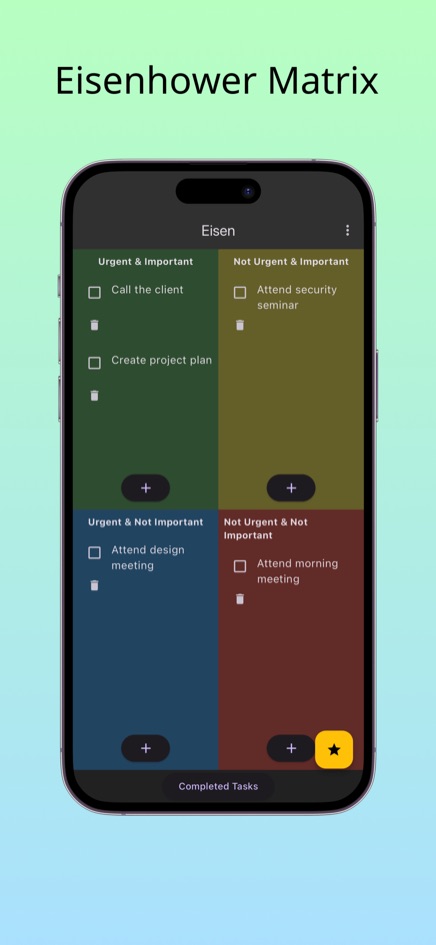
Eisen runs free in the browser with no sign-up, and is available for iPhone and Android.
Frequently asked questions
How many tasks should be in the urgent and important box?
As few as possible. If it regularly holds more than a handful, check each item with the 24-hour question, and look for second-quadrant tasks that were left until they became emergencies.
Is the Eisenhower Matrix good for students?
Yes. Assignments with distant deadlines belong in the second quadrant, and scheduling them early is what keeps the first quadrant manageable near exams.
How often should I update the matrix?
A quick look each morning and a fuller review once a week works for most people. Deadlines move tasks between boxes over time.
Where does Eisen store my tasks?
The web version keeps tasks only in your browser on your device, with no account. The phone apps for iPhone and Android work the same way on your phone.