How to Prioritize Tasks When Everything Feels Urgent
Some days every message is marked high priority, every deadline is today, and the to-do list is longer than the hours available. When everything feels urgent, it is tempting to work on whatever shouted last. That keeps you busy but rarely gets the right things done.
This guide gives a practical routine for those days. It takes about fifteen minutes, works on paper or in an app, and ends with a short list you can actually finish. It also compares a few popular prioritization methods so you can pick the one that fits.
Step 1: Get everything out of your head
Write down every task you are carrying, big or small, without sorting yet. Include the half-finished items, the replies you owe and the things you promised in passing. Part of the stress of an overloaded day comes from trying to remember all of it, and a complete list is calmer than a vague sense of too much.
Keep each item short and concrete. Draft budget section 2 is easier to judge than Budget.
Step 2: Test every urgent item
Urgency is often borrowed from someone else's stress. For each task that feels urgent, ask:
- Is there a real deadline, with a date and time, or does it just feel overdue?
- What concretely happens if it waits until tomorrow? Until next week?
- Who set the deadline, and could they accept a different one?
- Is it urgent because it was left late? Note that for later; it points to a planning gap.
Most lists shrink noticeably here. Many urgent items turn out to be requests that can wait a day with a short message.
Step 3: Sort with the Eisenhower Matrix
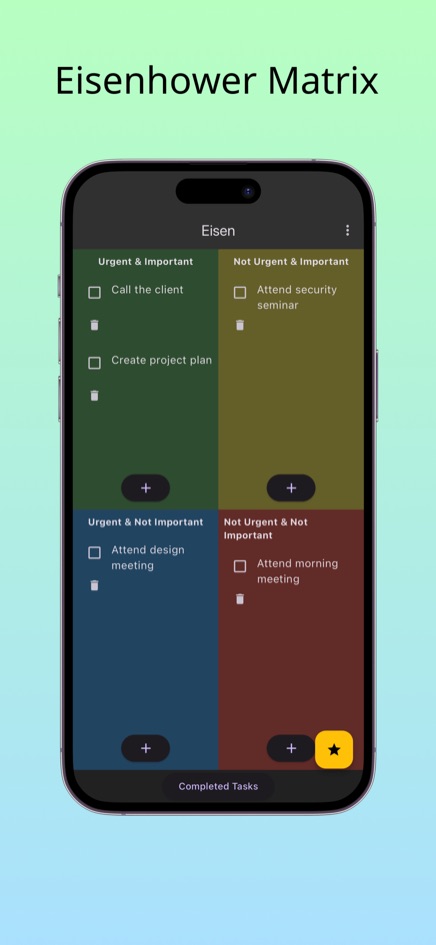
Now place each task in one of four boxes by asking whether it is urgent and whether it is important to your own goals:
- Urgent and important: do these first, today.
- Not urgent but important: give each a time slot this week, even a short one.
- Urgent but not important: delegate, batch into one block, or do a minimal version.
- Neither: delete them or leave them for when the pressure is off.
If you want worked examples for different jobs, see our Eisenhower Matrix examples.
Step 4: Pick three and estimate time
From the first box, choose the three tasks that matter most and estimate how long each will take. Then add up the time and compare it with the hours you really have, after meetings and interruptions. People routinely underestimate tasks, so add a buffer.
If the three do not fit, you have learned something important early in the day rather than at 6 pm: something has to move.
Step 5: Renegotiate, delegate, or shrink
When there is more urgent work than time, there are only a few honest options:
- Ask for a new deadline, early. A message such as: I can deliver this by Thursday noon, or a shorter version today; which is more useful? is usually received better than a missed deadline.
- Ask your manager or client to choose. If two urgent tasks compete, let the person who cares about both decide the order.
- Delegate the parts that do not need you.
- Reduce the scope: deliver the essential version now and the polished one later.
Step 6: Protect a little important, non-urgent time
On a frantic day the second quadrant disappears first. That is understandable for a day, but if it happens every day, today's planning work becomes next week's emergency. Even 20 minutes on one second-quadrant task keeps the cycle from repeating.
Batch the third quadrant too: answer the quick requests in one block rather than letting each one break your focus.
How this compares with other methods
- A simple numbered list is quick but hides the difference between urgent and important; the loudest task usually ends up at the top.
- The ABCDE method labels tasks by consequence (A must do, B should do, and so on). It is good for a single day but has no separate idea of importance versus urgency.
- The 1-3-5 rule (one big, three medium, five small tasks per day) is excellent for limiting the list, and combines well with the matrix: take the big task from the first or second quadrant.
- The Eisenhower Matrix is best when urgency is the problem, because it makes you question it for every single task.
Doing this routine in Eisen
Eisen keeps the matrix on your phone, so you can repeat the routine whenever the day changes:
- During the brain dump, tap + for each task and drop it straight into the quadrant that seems right.
- After testing deadlines, tap any task you misjudged and choose Move to put it in the correct quadrant.
- Use the List tab to scan everything grouped by quadrant and choose your three.
- Tick tasks off as you finish them. They move to Completed Tasks in the menu, which is a useful record at the end of a hard week.
Eisen is free on the web and available for iPhone and Android.
Frequently asked questions
What if my boss says everything is urgent?
Show the list with your time estimates and ask which task should come first. Making the trade-off visible is usually more effective than trying to do everything at once.
How long should this take?
About fifteen minutes the first time, and a few minutes on later days once the list exists.
Should I do the quickest tasks first to clear the list?
Only if they are in the first quadrant or block someone else. Otherwise batch them, so the important work gets your best hours.
Do I need an account to use Eisen?
No. The web version saves tasks in your browser on your device, and the phone apps are on the App Store and Google Play.