Fishing Log Template: What to Record After Every Catch
A fishing log turns days on the water into information. One trip tells you very little, but twenty trips written down the same way start to show which spots work in which conditions, when a species arrives each year, and which lure keeps earning its place in the box.
The trick is recording the right things consistently, without making the log so long that you stop filling it in. This guide gives a template you can copy to a notebook or spreadsheet, explains why each field matters, compares paper, spreadsheets and apps honestly, and shows how to review a season once you have the data.
The template
Copy these fields into a notebook page, the columns of a spreadsheet or a note on your phone. The first group is the core; the second is worth adding once the habit sticks.
Core fields (every catch)
- Date and time
- Spot name (use the same name every time)
- Species
- Length
- Weight (if you weighed it)
- Lure or bait, including size and color
- Tackle: rod, line or rig
- Weather: sunny, cloudy, rainy, snowy or windy
- Water temperature
- Notes: depth, retrieve, how it took the bait, released or kept
Extra fields (when you can)
- Tide stage on the coast: rising, high, falling or low
- Wind direction and strength
- Water clarity: clear, stained or muddy
- Air pressure trend: rising, steady or falling
- Time spent fishing, so blank hours count too
- A photo
Why these fields matter
Spot names only help if they are consistent. North point and north rocks will be treated as two places by any filter or spreadsheet sort, so pick one name and stick with it.
Water temperature is one of the most useful numbers you can collect. Most fish are cold-blooded, so their activity and location change with it through the season. A cheap thermometer, used at roughly the same depth each time, gives readings you can compare between trips.
Weather and light affect how wary fish are. Many anglers believe overcast, slightly breezy days fish better than bright, calm ones. A log lets you test that belief against your own results rather than taking it on trust.
The lure or bait field is where most surprises come from. Write the size and color too; small details like a darker color in murky water often turn out to matter.
Do not skip the blank days
A log of only successful trips makes every condition look good. If you fished three hours at a spot and caught nothing, that is data. On paper, write the trip with no catch. In an app built around catches, add a line about the blank session in the notes of your next catch, or keep a separate trip note. Over a season, the ratio of catches to hours tells you far more than the catches alone.
Paper, spreadsheet or app?
Paper notebook
Cheap, works without battery or signal, and pleasant to flip through years later. It is hard to search, though: answering a question like when did I last catch trout at the reservoir means reading every page. Rain and fish slime are also hard on paper; a waterproof notebook helps.
Spreadsheet
Excellent for analysis. Columns can be sorted and filtered, and charts are a few clicks away. The downside is entry: typing into a spreadsheet on a phone at the water's edge is awkward, so many people jot notes and copy them in later, and some never do.
A fishing log app
Built for entry on the bank, with fixed fields, a photo attached to each catch and filters ready to use. You give up some flexibility: you can only record what the app has fields for, so extra details go in the notes.
Using the template in Fishing Log
Fishing Log has fields for most of the core template, and the notes field takes the rest:
- Tap the add button. The date and time are set to now; change them if you are logging a catch from earlier.
- Type the species, then the length and weight. Choose metric or imperial units in Settings.
- Enter the spot name, pick the weather, and type the water temperature if you took it.
- Write the lure or bait and the tackle you used.
- Use the memo for tide, wind, clarity, depth, retrieve or a blank session earlier in the day.
- Attach a photo of the catch.
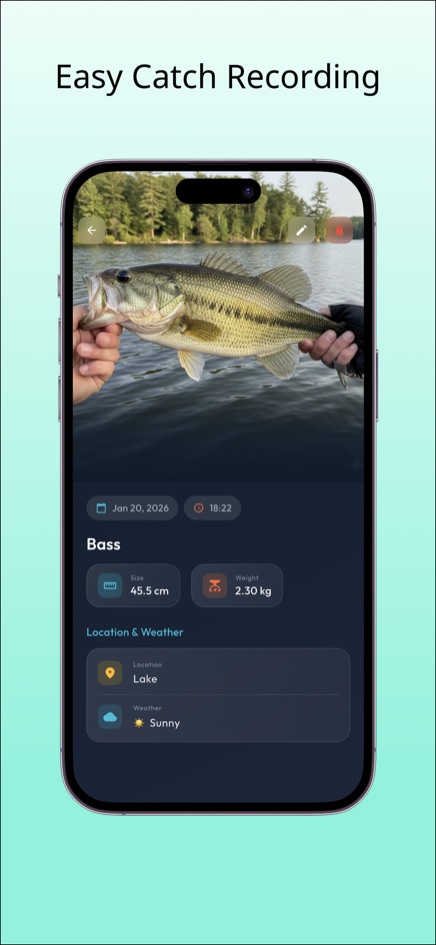
Fishing Log is free on the web and available for iPhone and Android. It does not fetch weather or tides automatically; you enter them yourself.
Reviewing a season
A log pays off when you read it back. A few questions to ask at the end of a season, or before a new one starts:
- Which months produced most catches for each species? In Fishing Log, the statistics screen shows a monthly chart and a species breakdown for the year you choose.
- Which spots produced in which weather? Filter by location and compare the weather on each catch.
- Which lures appear again and again in your best catches, and which never do?
- At what water temperature did a species start or stop showing up?
Write the answers down as a short plan for next season. That plan is the real product of your log.
Frequently asked questions
What is the most important thing to record?
Consistency matters more than any single field. Date, spot, species, bait and weather, recorded the same way every time, will reveal more than a detailed log you only keep for a few weeks.
Should I record fish I release?
Yes. Released fish tell you as much about the spot and conditions as kept ones. Note in the memo that it was released.
Can I print this template?
Yes. Copy the field list into a document or a notebook page with one row per catch. The core fields fit across a landscape page.
What does the phone app add compared with the web version?
The web version of Fishing Log holds up to 30 records. The iPhone and Android apps can unlock unlimited records, detailed statistics including personal bests, CSV export, and backup and restore.