How to Keep a Food Diary You Will Actually Stick With
A food diary is one of the simplest ways to see how you really eat. Memory is unreliable: snacks, drinks and second helpings disappear from it within hours, and one good or bad day tends to colour how we remember a whole week. A written record, even a rough one, replaces that impression with something you can look at.
Most food diaries are abandoned within a few days, usually because they ask for too much. This guide shows a lighter method that people tend to keep up: decide why you are keeping the diary, record a few useful details as you eat, and review once a week. It also compares paper, spreadsheets and apps, and shows how to keep the diary in Foodlog.
1. Decide what the diary is for
The purpose decides what you need to record. Some common ones:
- Noticing habits, such as how often you eat out, skip breakfast or snack late. Times, places and a short description are enough.
- Eating more home-cooked meals. Note where each meal came from and whether you would make it again.
- Keeping an eye on calories. Add an estimate for each meal, accepting that most numbers will be approximate.
- Preparing for an appointment. If a doctor or dietitian has asked you to keep a diary, for example to look at symptoms, follow the format they give you; they know what information they need.
Write the purpose at the top of the first page or in the first entry. When you are tempted to record everything, it reminds you what actually matters.
2. Record a few useful details
For each meal, these details cover most purposes:
- When: the date and which meal it was.
- What: the main foods, in everyday words. "Chicken curry, rice, side salad" is fine.
- How much: rough portions using familiar measures, such as a fist of rice, two slices of toast or a large bowl.
- Drinks: easy to forget and often worth noting, especially juices, sodas, coffee drinks and alcohol.
- Context: where you ate, who with, how hungry you were, and whether you were rushing or distracted.
A photo taken before you start eating captures the plate and portion size in a second, and is often more honest than a description written later.
3. Record at the time, not at night
Entries made at the meal are more accurate than a day reconstructed from memory in the evening. If writing at the table is awkward, take a photo and add the words later. A daily reminder at your usual meal times helps until the habit sticks.
Missing a meal or a whole day is normal. Leave the gap and carry on; trying to fill in a week from memory produces a record you cannot trust.
4. Review once a week
A diary only becomes useful when you read it. Once a week, spend ten minutes looking back and ask:
- Which meals did I enjoy most, and which did I regret?
- How many meals were home-cooked, takeout or eaten out?
- Were there times of day or situations where I ate without really noticing?
- Is there one small, realistic change worth trying next week?
Pick one change at a time, such as adding vegetables to lunch or planning two home-cooked dinners. Small changes are easier to keep, and next week's diary shows whether they worked.
Paper, spreadsheet, nutrition app or photo diary?
Paper notebook
Cheap, private and flexible, and writing by hand makes you pay attention. But it is easy to leave at home, there are no totals, and reviewing weeks of entries means flipping pages.
Spreadsheet
Good for totals and sorting, and free. It is awkward to fill in on a phone at the table, and photos do not fit well.
Calorie-counting app with a food database
Searching a database gives detailed nutrition figures, which suits people who want precise numbers. The searching and weighing take time at every meal, and that effort is a common reason people stop.
Photo food diary
A photo plus a short note is the fastest way to log a meal, and the pictures make reviewing quick and visual. The trade-off is less precise nutrition data: any numbers are your own estimates.
How to keep a food diary in Foodlog
Foodlog is a photo-based food diary organised around breakfast, lunch and dinner:
- Open the Meal Record tab, which starts on today. Tap the date at the top to choose another day if you are catching up.
- Tap Record Breakfast, Record Lunch or Record Dinner.
- Add a photo with Take Picture or Select from Gallery, write a short description, or both. At least one of the two is needed.
- If you track calories, enter an estimate in kcal; the day's total at the top updates automatically.
- Give the meal one to five stars and choose tags such as Homemade, Takeout, Dining Out, Vegetarian or High Protein.
- For the weekly review, open the Calendar tab to see which days have records, then tap the statistics icon for total records, average calories, counts by meal type, most-used tags and your highest-rated meals.
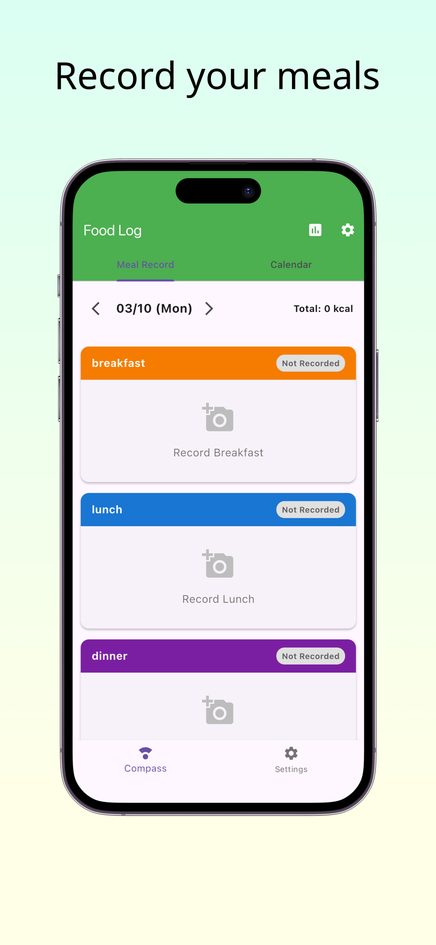
Foodlog has no food database and no snack slot; many people add snacks to the description of the nearest meal. The iPhone and Android apps can remind you to log at your chosen meal times. For ideas on what to write, see our food journal ideas.
Keep it helpful
A food diary should make eating clearer, not more stressful. If logging starts to feel anxious or obsessive, take a break. For medical or dietary needs, a doctor or registered dietitian can give advice tailored to you.
Frequently asked questions
How long should I keep a food diary?
Two to four weeks is usually enough to see patterns, because it covers several of each weekday and weekend. Many people then keep a lighter version going, or come back to it when they want to check in.
Do I have to count calories?
No. Notes, photos, tags and ratings already show a lot about how you eat. Calories are optional in Foodlog.
Is it better to take photos or write descriptions?
Both have strengths. A photo is fast and shows portion size; a few words add what the photo cannot, such as ingredients, drinks and how hungry you were.
Can I add meals to a past day in Foodlog?
Yes. Tap the date at the top of the Meal Record tab and choose the day you want to fill in.
Where does the web version of Foodlog store my meals?
Only in your browser on your device, with no account. Clearing your browser data removes them, and they do not sync with the phone apps.