How to Plan Your Day to Be Productive: A 10-Minute Routine
Planning your day does not need a complicated system. Most productive days have the same ingredients: you knew what mattered most, you did it before the day filled up, and your list was realistic enough to finish.
This guide gives you a ten-minute planning routine you can do the evening before or first thing in the morning, explains why time estimates and buffer matter, compares paper and app planning honestly, and shows how to plan your day in the Frog app.
When to plan
Plan either the evening before or as the first thing you do in the morning. Planning the night before means you start the day knowing exactly what to do first, and you are less tempted to open email for "just a minute". Morning planning works better if your evenings are unpredictable. Pick one and keep it consistent.
The 10-minute daily planning routine
- Check fixed commitments: meetings, classes, appointments, school runs. These set how much free time you really have.
- Brain dump: write every task on your mind, big and small, without sorting.
- Cross out or postpone anything that does not need to happen today.
- Pick one most important task, the one that would make the day a success even if nothing else got done. This is your frog.
- Estimate how long each remaining task will take.
- Add up the estimates and compare them with your free time. If they do not fit, move tasks to another day now rather than at 6 pm.
- Order the list: the most important task first, then other tasks with deadlines, then everything else.
- Leave buffer. Plan for less time than you have, because interruptions always come.
Why estimates and buffer matter
Most daily plans fail because they were never possible. Writing an estimate next to each task, even a rough one, shows you when the list is two days of work squeezed into one.
Estimates also get better with practice. Compare your guesses with how long tasks actually took, and you will start to see which kinds of work you underestimate. Leaving some of the day unplanned absorbs the surprises without wrecking the whole plan.
During the day
- Start with the most important task before checking messages if you can.
- When new tasks arrive, add them to the list instead of doing them immediately, unless they are truly urgent.
- Tick tasks off as you finish them; seeing progress helps.
- If the plan breaks, re-plan in two minutes: what is the most important thing left for today?
The end-of-day review
Spend a couple of minutes before you stop: what got done, what moves to tomorrow, and what is tomorrow's most important task? This is also the easiest moment to plan the next day, which closes the loop.
Once a week, look back over the days. Were your most important tasks done most days? Which tasks keep moving? A task that slides all week either needs breaking down or does not really matter.
Paper planner or app?
Paper planner or notebook
Fast to write, no distractions, and crossing items off is satisfying. Repeating tasks must be rewritten, unfinished tasks copied forward by hand, and there are no totals or reminders.
Calendar app
Good for fixed appointments and time blocks. Less good as a to-do list: tasks without a fixed time do not fit naturally.
To-do list app
Handles repeating tasks, due dates, sorting and totals automatically, and is with you on your phone. It can tempt you into endless reorganising; keep the routine above, whatever the tool.
If your problem is too many urgent tasks rather than planning itself, see how to prioritize tasks when everything is urgent.
Planning your day in Frog
Frog fits the routine above: the most important task is the frog, and the list shows how much time your tasks need.
- Add each task with the round add button, with a title, due date and time.
- Set your most important task to high priority so it is marked as a frog.
- Enter the estimated hours and minutes for each task. Frog adds them up so you can see how much work is waiting.
- Use tags such as work or home, and set regular tasks to repeat daily, on weekdays, weekly or monthly. Finishing a repeating task creates the next one automatically.
- Filter the Active tab by today, upcoming (next seven days) or overdue, and sort by priority or deadline.
- Tick tasks as you finish them. Completed tasks move to the Completed tab.
- For your weekly review, open the analytics screen for completion rate, frogs eaten, overdue tasks, time spent and time still needed.
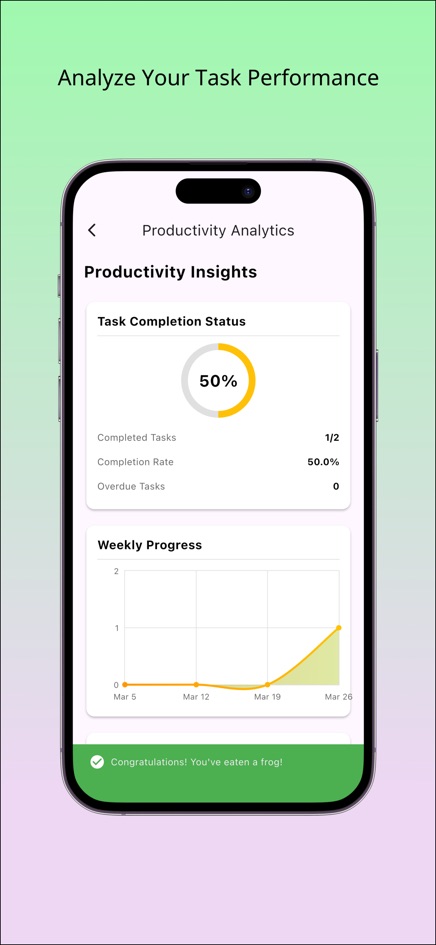
In Settings you can set daily and weekly frog goals and choose a light, dark or system theme. The web version keeps your tasks in your browser. The iPhone and Android apps add deadline notifications and a daily reminder. More on the method: the Eat That Frog method.
Frequently asked questions
Should I plan my day the night before or in the morning?
Either works. The night before lets you start immediately; the morning suits unpredictable evenings. Consistency matters more than timing.
How many tasks should be on a daily to-do list?
As many as fit in your free time with some buffer, based on your estimates. For many people that is one important task plus a handful of smaller ones.
What should I do with tasks I didn't finish?
Move them to tomorrow during your end-of-day review, or drop them if they no longer matter.
Can Frog repeat tasks every weekday?
Yes. Choose the weekdays repeat; it skips Saturday and Sunday.
Does the Frog web version send reminders?
No. Notifications and the daily reminder are only in the iPhone and Android apps.