How to Keep Soccer Stats for an Amateur or Youth Team
Professional teams have analysts and data providers. A Sunday league side or an under-10 team has a coach, maybe an assistant, and a parent on the touchline with a phone. That is still enough to keep useful statistics, as long as you track the right few things and have a simple way to record them while the game is going on.
This guide covers which stats are worth keeping for an amateur or youth team, how to record them during a match, how to add them up over a season, and how to use the numbers fairly. It compares paper, spreadsheets and apps, and shows how to do it in KickOff.
What to track
Start small. These cover most of what a grassroots team needs:
- Results: date, opponent, home or away, final score.
- Goals: who scored and roughly when.
- Assists: who made the final pass, if it is clear.
- Cards: yellow and red cards, which matter for suspensions in many leagues.
- Substitutions: who came off and who came on.
- Attendance: who was available for each match.
More detailed numbers, such as shots, tackles or passes, are tempting but hard to record accurately without a dedicated person watching only that. Add them later if you have the help.
How to record stats during a match
- Give the job to one person. The coach is busy coaching; a substitute, assistant or parent can usually take it on.
- Prepare before kick-off: the date, opponent, starting lineup and bench should already be written down.
- Start a clock at kick-off so you can note the minute of each event. Pause it at half time.
- Record each event straight away: minute, type and player. Do not wait for a break in play; you will forget.
- When an assist or a scorer is unclear, write your best guess with a question mark and check with the coach afterwards.
- At the final whistle, check the score in your notes against the referee's or the other team's.
Turning match notes into season stats
After each match, add the result and events to a running record. The season figures most teams find useful are:
- Played, won, drawn and lost.
- Goals for and goals against, and goal difference (goals for minus goals against).
- Win rate: wins divided by matches played. Five wins from eight matches is 62.5%.
- Recent form: the results of the last few matches, for example W-W-D-L-W.
- Top scorers and assist providers.
- Cards per player, so you can see who is close to a suspension under your league's rules.
- Attendance per player across the season.
Using stats fairly
Goals and assists are the most visible numbers, but they say little about defenders, goalkeepers or the midfielder who did all the running. In youth soccer especially, use stats as a conversation starter rather than a ranking. Many coaches share team stats openly but keep individual figures private, or highlight effort and improvement alongside goals.
Attendance records are useful for planning lifts, picking captains and making sure playing time is fair, rather than for judging players who cannot always come.
Paper scoresheet, spreadsheet or app?
Paper scoresheet
A clipboard with columns for minute, event and player works in any weather and needs no battery. Afterwards, though, someone has to type it up, and season totals take time to add.
Spreadsheet
Ideal for season totals, with formulas for win rate and goal difference. It is awkward to fill in live on a phone, so most people combine it with paper notes during the game.
Team manager app
Lets one person record events live on a phone with the clock running, and totals the season automatically. The trade-off is setting up the squad first and keeping the phone charged.
How to keep soccer stats in KickOff
KickOff is built for this job. The workflow follows a match day:
- Before the season, add your players in the Team tab with name, shirt number and position.
- Create each match with the date and time, opponent, home or away, and location. Mark attendance as attending, maybe or absent.
- Set out the lineup in the Lineup tab, with the rest of the squad on the bench.
- At kick-off, open the match and start the clock. Record Goal adds a goal with an optional assist; Record Yellow Card and Record Red Card log cards; Record Substitution records the player going off and the player coming on.
- Pause at half time and tap Start Second Half when play resumes. End the match at the final whistle.
- Open the Stats tab for the Season Overview: matches, wins, draws, losses, win rate, goals scored and conceded, goal difference, recent form and top performers.
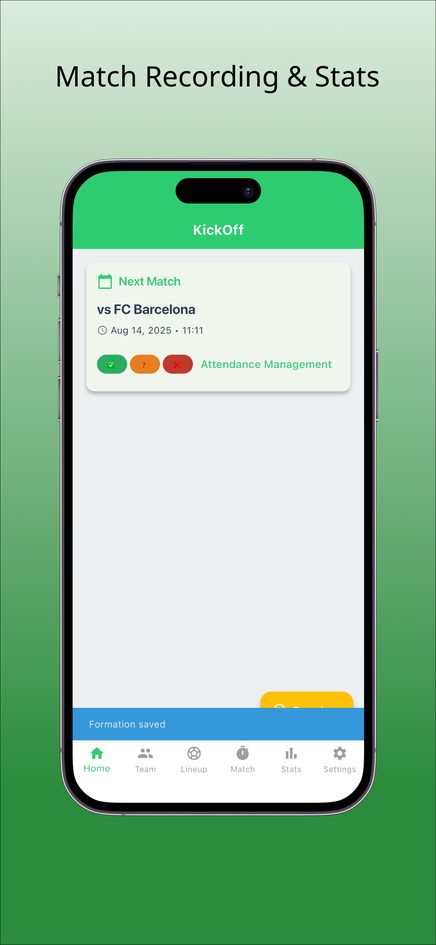
Team data in the web version stays in one browser on one device. The iPhone and Android apps can also share match results and team statistics as text for your team chat. For choosing a small-sided shape, see our guide to 7v7 soccer formations.
Frequently asked questions
What are the most important stats for an amateur soccer team?
Results, goals, assists, cards and attendance. They are easy to record accurately and cover most of what a coach needs over a season.
How do you calculate goal difference?
Subtract goals conceded from goals scored. A team that scored 24 and conceded 17 has a goal difference of +7.
How do you calculate win rate?
Divide the number of wins by the number of matches played and multiply by 100. Six wins from ten matches is a 60% win rate.
Does KickOff track minutes played?
KickOff records the minute of each goal, card and substitution, but it does not total minutes played per player.
Can several coaches update the same team in KickOff?
No. There is no shared online team; data is stored on the device you use. Have one person keep the stats.