How to Count Rows in Knitting (Stockinette, Garter and Ribbing)
Sooner or later every knitter puts the work down, comes back and has no idea which row they are on. The good news is that the fabric itself is a record: every row leaves a visible mark, and once you know what to look for you can count rows on any project.
This guide shows how to count rows in stockinette, garter, ribbing and seed stitch, explains the common question of whether the cast-on and the stitches on the needle count, gives tips for long projects, compares counting on the fabric with tally marks, clicker counters and apps, and ends with how to keep count in Knitly.
What counts as a row
In flat knitting, one row is one pass across all the stitches, from one needle to the other. In circular knitting, one trip around is called a round, and you count rounds the same way. Each row adds one loop on top of every stitch below it, so counting rows means counting loops stacked in a column.
Always count up a single column of stitches, not diagonally across the fabric, and count in good light. A blunt needle tip or a crochet hook is handy for pointing at each stitch as you go.
Counting rows by stitch pattern
Stockinette (stocking stitch)
On the knit side, each stitch looks like a small V. Pick one column and count the Vs from the bottom up: one V is one row. On the purl side, each row shows as a horizontal bump, and each bump is one row, though bumps are harder to see, so most knitters count on the knit side.
Garter stitch
Garter stitch forms horizontal ridges, and each ridge is made of two rows. Count the ridges on one side and multiply by two. Counting the dips between ridges as well gives you the odd rows.
Ribbing
In k1 p1 or k2 p2 rib, the knit columns stand out. Gently stretch the fabric sideways and count the Vs up one knit column, exactly as in stockinette.
Seed stitch (moss stitch)
Seed stitch alternates knits and purls in every row, so a column looks like V, bump, V, bump. Count every V and every bump in the column: each is one row. This is the trickiest common stitch to count, so a counter or markers help.
Do the cast-on and the needle row count?
Patterns differ, which is why this question comes up so often. Most patterns do not count the cast-on as a row. Many cast-ons, such as the long-tail cast-on, create something that looks like a row of bumps at the bottom edge; skip that when counting. The loops currently sitting on the needle are the row you most recently worked, so include them in your count.
If the pattern says something like "work 20 rows after the cast-on", start counting from the first row you knit after casting on. When in doubt, check the pattern's notes or the designer's errata page.
Tips for long projects
- Place a removable stitch marker every 10 or 20 rows, so you only ever count a short section.
- Thread a lifeline, a strand of smooth contrasting yarn, through a row you know is correct. It also lets you rip back safely.
- Count at the same moment every time, for example as soon as you finish the last stitch of a row, before turning.
- Finish the row before you stop for the day, so the count and the needle agree.
- For patterns that repeat, keep two counts: total rows and the row within the repeat.
Counting the fabric, tally marks, clickers or an app?
Counting the fabric
Always available and the final check for any other method. It is slow on long pieces and hard on dark yarn, fuzzy yarn or textured stitches.
Tally marks on the pattern
Free and visible right next to the instructions. They are easy to forget to make, and a pencil mark cannot be undone neatly.
Barrel or clicker counters
A row counter on the end of a needle or a hand clicker is quick and tactile. Barrel counters do not fit every needle, clickers get lost in project bags, and one device tracks only one number.
Counter app
An app on your phone can hold several counts per project, remember them for weeks and show the pattern next to the count. You need your phone at hand, and tapping takes the place of a satisfying click.
How to keep count in Knitly
Knitly replaces tally marks and clickers with a large on-screen counter.
- Create a project, give it a name such as Winter Beanie, and optionally set a target row count and a memo.
- Open the project and tap the counter each time you finish a row. Press and hold to subtract one if you tapped too early.
- If you have already knitted some rows, count them on the fabric as described above and tap up to that number.
- Add a second counter for repeats or shaping, with its own name and target.
- Add a photo of your chart or pattern page so it is on screen while you count.
- When the project is finished, mark it complete to move it to the Completed list.
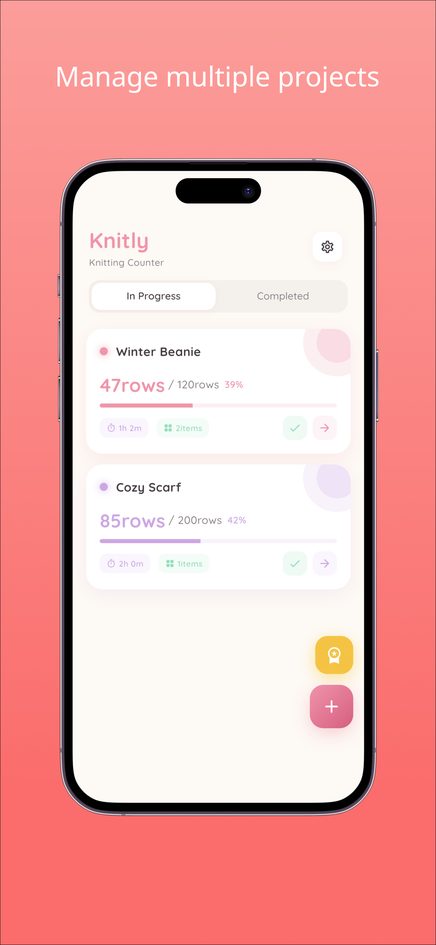
The web version holds up to three projects at a time; the iPhone and Android apps can optionally remove this limit. For more on counters, see how to use a row counter in knitting.
Frequently asked questions
How many rows are in one garter ridge?
Two. Each ridge is made by knitting one row on the right side and one on the wrong side.
Should I count the cast-on as row 1?
Usually not. Most patterns start counting from the first row worked after the cast-on. Check your pattern's notes if it says otherwise.
Do I count the stitches on the needle?
Yes. The loops on the needle are the last row you worked, so include them.
How do I count rows in crochet?
Count the rows of stitches stacked on top of each other, for example each row of double crochet posts. A counter works the same way for crochet rows and rounds.
Where does Knitly store my counts?
In the web version, only in your browser on that device, with no account. Clearing browser data deletes them, and they do not sync with the phone apps.