How to Use a Row Counter in Knitting (and Crochet)
A row counter is one of the simplest knitting tools, and one of the easiest to use inconsistently. Click it at the wrong moment, forget to click after an interruption, or try to track two things with one counter, and the number stops matching your knitting.
This guide explains when to click, how to use two counters for repeats and shaping, the main types of row counter with their honest pros and cons, how to recover from a wrong count, and how the same approach works for crochet. It ends with how to set up counters in Knitly.
When to click: pick one moment
The single most important habit is to advance the counter at the same point in every row. Most knitters click as soon as they work the last stitch of a row, before turning the work. Others click at the start of a new row. Either is fine; mixing them is what causes errors.
Decide what the number means, too. If you click after finishing a row, the counter shows rows completed. If you click before starting, it shows the row you are on. Write your choice on the pattern so you remember after a break.
Using a row counter step by step
- Set the counter to zero after casting on, unless your pattern counts the cast-on as row 1.
- Knit the first row, then click once.
- Keep clicking at the end of every row, or every round if you knit in the round.
- When the pattern says to do something on a certain row, such as start a decrease on row 24, check the counter before you begin each row.
- If you put the knitting down mid-row, finish the row and click before stopping, or leave a note saying the counter has not been advanced.
- Every so often, check the counter against the fabric by counting the rows above a stitch marker.
Repeats and shaping: use two counters
Many patterns ask for two things at once: a stitch pattern that repeats every few rows and shaping that happens on some rows. Trying to work both out from one total quickly gets confusing. Use two counters instead:
- Total rows: never reset. It tells you how far into the piece you are.
- Repeat or shaping counter: reset when a repeat ends. For a 12-row cable, count 1 to 12 and reset. For "decrease every 4th row, 6 times", count decrease rows towards a target of 6.
Give each counter a clear name, such as Total, Cable row or Decreases. When you look up mid-row, you should know at a glance which number is which.
Types of row counter compared
Barrel counter
A small cylinder that slides onto the end of a straight needle; you turn the dial at the end of each row. Cheap and always with the work, but it only fits certain needle sizes, does not suit circular needles, and can be turned by accident.
Clicker counter
A hand-held or pendant counter with a button. Quick and tactile, and it works with any needles. It tracks one number, and being separate from the knitting, it is easy to lose or to forget to click.
Row counter chain or ring
A string of numbered beads or markers that sits on the needle; you move a marker along to show the row. It travels with the work and is satisfying to use, but it can catch on yarn and counts only a limited range.
Tally marks
A pencil mark per row on the pattern. Free and flexible, but untidy to correct, and you cannot see the total at a glance.
Counter app
A phone app can hold several named counters per project, set targets, undo a mistaken tap and remember counts for months. It depends on having your phone nearby and charged.
When the counter is wrong
If the counter and the knitting disagree, trust the knitting. Count the rows on the fabric from your last marker or lifeline (see how to count rows in knitting), correct the counter, and carry on. If you often find the counter one ahead, you are probably clicking at the start of rows some of the time; if it is behind, you are probably forgetting after interruptions.
Row counters for crochet
Crochet works the same way: click at the end of each row, or each round when working in the round. Because crochet stitches vary in height, counting rows on the fabric is often easier than in knitting, but a counter is still useful for long blankets, amigurumi rounds with increases, and patterns with repeats.
Setting up counters in Knitly
Knitly puts a large counter on your screen and lets you add several named counters to a project, each with an optional target.
- Create a project and give it a name, an optional target row count and a memo for yarn or needle details.
- Open the project and tap the big counter to add one. Press and hold to subtract one.
- Add another counter for a repeat or shaping, name it and set a target, such as 6 decreases.
- Use a counter's menu to rename it, change its target, reset it to zero at the end of a repeat, or delete it.
- Add a photo of the chart or pattern page so it sits above the counters, and tap it to zoom in.
- Press Start on the timer when you begin knitting and Stop when you finish, to keep a running total of time spent.
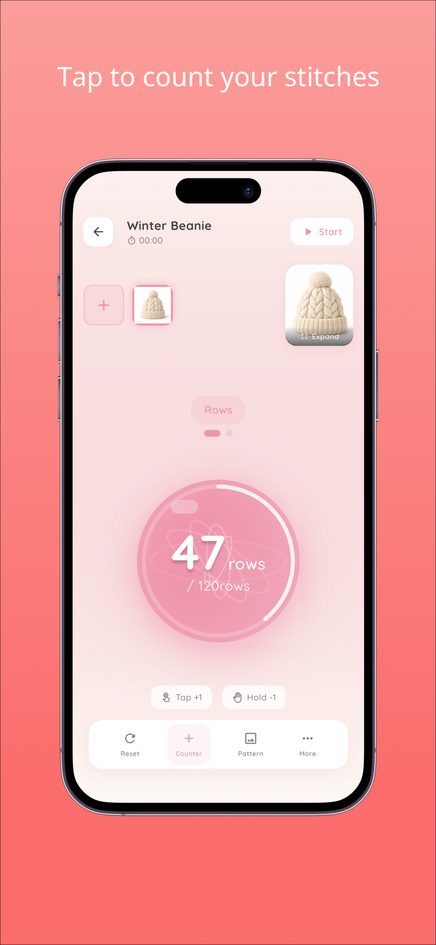
The web version holds up to three projects at a time. Knitly is also available for iPhone and Android.
Frequently asked questions
Do I click the row counter before or after the row?
Either works, as long as you always do the same. Most knitters click right after finishing the last stitch of a row.
Should I reset my row counter?
Keep one counter for total rows that you never reset, and reset a second counter at the end of each repeat.
How do I use a row counter with circular needles?
Use a clicker, a counter chain or an app, and click at the end of each round, usually marked with a beginning-of-round stitch marker.
I tapped Knitly's counter twice by mistake. How do I fix it?
Press and hold the counter to subtract one, or reset it from the counter's menu and tap back up to the right number.
Does Knitly's timer keep running if I close the page?
Stop the timer before closing the page so the session time is added to the project total.