How to Calculate Hours Worked (Including Breaks and Overnight Shifts)
Checking your hours is one of the simplest ways to make sure a payslip is right, but it gets fiddly fast: shifts that cross midnight, unpaid breaks, times like 7:45 that do not divide neatly, and weeks where you swapped shifts with a colleague.
This guide shows a reliable step-by-step method for calculating hours worked by hand, with examples for normal and overnight shifts, a minutes-to-decimal table, the spreadsheet formulas that do it automatically, and how to total a week and spot possible overtime. It ends with how Shift Calendar adds up your hours for you.
Step by step: hours for one shift
- Write the start and end times in 24-hour format. 9:30 am becomes 09:30, and 6:15 pm becomes 18:15.
- Convert both to minutes after midnight: hours × 60 + minutes. 09:30 is 570 and 18:15 is 1,095.
- Subtract start from end: 1,095 − 570 = 525 minutes.
- If the result is negative, the shift crossed midnight. Add 1,440 (the minutes in a day).
- Subtract any unpaid break. With a 30-minute unpaid break: 525 − 30 = 495 minutes.
- Divide by 60 for hours: 495 ÷ 60 = 8.25 hours, or 8 hours 15 minutes.
Worked examples
Day shift
07:00 to 15:30 with a 30-minute unpaid break: 930 − 420 = 510 minutes, minus 30 = 480 minutes = 8 hours.
Overnight shift
22:00 to 07:00 with a 60-minute unpaid break: 420 − 1,320 = −900, plus 1,440 = 540 minutes, minus 60 = 480 minutes = 8 hours. The common mistake is to subtract 22 from 7 and get a negative number; adding a full day fixes it.
Twelve-hour shift
19:00 to 07:30 with two unpaid 30-minute breaks: 450 − 1,140 + 1,440 = 750 minutes, minus 60 = 690 minutes = 11.5 hours.
Converting minutes to decimal hours
Payroll systems usually use decimal hours, so 7 hours 45 minutes is written 7.75, not 7.45. Divide the minutes by 60:
- 6 minutes = 0.1 hours
- 10 minutes ≈ 0.17 hours
- 15 minutes = 0.25 hours
- 20 minutes ≈ 0.33 hours
- 30 minutes = 0.5 hours
- 45 minutes = 0.75 hours
Some employers round clock times to the nearest few minutes. If yours does, check how, so your own totals use the same rule.
Totalling a week and checking overtime
Add the decimal hours for each shift in the pay period. Then compare with any daily or weekly limit in your contract. For example, if overtime starts after 40 hours a week and you worked 8.25 + 8 + 11.5 + 11.5 + 8 = 47.25 hours, the last 7.25 hours may count as overtime.
Overtime, break and pay rules depend on your country, region, sector and employment contract. This guide shows the arithmetic only. For the rules that apply to you, check your contract or ask your employer, union or local labour authority.
By hand, spreadsheet or app?
By hand or with a calculator
The minutes method above works anywhere and helps you understand your payslip. It is slow for a whole month and easy to slip on overnight shifts.
Spreadsheet or timesheet template
With start time in A2, end time in B2 and the unpaid break in minutes in C2, the formula =MOD(B2-A2,1)*24-C2/60 gives decimal hours in Excel and Google Sheets, including shifts that cross midnight. MOD adds the missing day automatically. Format the time cells as times and the result cell as a number. Spreadsheets are great for totals but need setting up and are clumsy on a phone.
Shift app
If your shifts have fixed start and end times, an app that knows each shift type can total the hours for you as soon as the shifts are on the calendar. For irregular clock-in times, a timesheet is more precise.
Letting Shift Calendar add up your hours
Shift Calendar calculates hours from the shift types you define, so each shift only needs to be set up once.
- In Settings, open Shift Types and tap +.
- Enter a name, a short code and a colour, then the start and end times. Overnight shifts such as 22:00 to 07:00 are fine.
- Enter the unpaid break in minutes, and an hourly rate if you want an income estimate.
- Place shifts on the calendar with paint mode, or apply a repeating rotation.
- Read the summary bar at the bottom of the month: work days, hours and estimated income.
- In Settings, set the currency and an overtime threshold to match your situation.
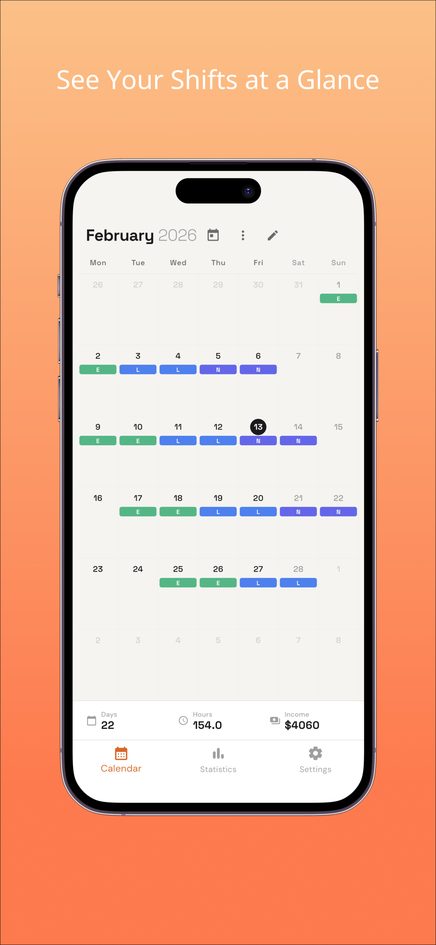
Income figures are estimates from hours and your hourly rate; night premiums, holiday pay and deductions are not included. The iPhone and Android apps add statistics by shift type with overtime days and CSV export. If your hours follow a repeating pattern, see rotating shift schedule examples.
Frequently asked questions
How do I calculate hours for a shift that goes past midnight?
Subtract the start time from the end time in minutes, and if the result is negative, add 1,440 minutes (24 hours). In a spreadsheet, =MOD(end-start,1)*24 does this automatically.
Should I include breaks in my hours worked?
Subtract unpaid breaks. Paid breaks usually count as working time. Your contract says which breaks are paid.
Why is 7 hours 30 minutes written as 7.5?
Payroll uses decimal hours, and 30 minutes is half an hour. Divide the minutes by 60 to convert.
Are Shift Calendar's income totals exact?
No. They are estimates based on hours, breaks and the hourly rate you set, without premiums, overtime rates or deductions.
Where are my shifts stored?
In the web version, only in your browser on that device, with no account. Clearing browser data removes them.