Rotating Shift Schedule Examples: 2-2-3, 4 On 4 Off, DuPont and More
If your workplace runs around the clock, your schedule probably follows a rotation: a fixed sequence of shifts and days off that repeats every few days or weeks. Once you understand the pattern, you can work out any future day yourself, plan holidays and family events, and check that your rota adds up.
This guide explains the most common rotating shift schedules with their cycle lengths and average weekly hours, shows how to calculate those figures for any pattern, compares paper, spreadsheet and app methods of keeping track, and ends with how to set up a rotation in Shift Calendar. Pattern names vary between countries and employers, so always check your own rota.
What makes a schedule "rotating"
A rotating schedule repeats a cycle, for example two day shifts, two night shifts and four days off. Two numbers describe it: the cycle length (how many days before the pattern starts again) and the anchor date (a day when you know where you are in the cycle). With those two facts, every future day can be worked out.
Rotations are common in healthcare, emergency services, manufacturing, utilities, security, logistics and hospitality, where a site needs to be staffed at all hours by several teams, often called crews or watches.
Common 12-hour rotations
2-2-3
Work 2 days, off 2, work 3, off 2, work 2, off 3, over a 14-day cycle. Each person works 7 shifts every two weeks and gets every other weekend off. At 12 hours a shift, that averages 42 hours a week. It is often called a Pitman or Panama schedule, although employers use those names loosely.
4 on, 4 off
Work 4 shifts, then 4 days off, over an 8-day cycle. Because 8 days does not fit neatly into a week, your days off move through the week over time. At 12 hours a shift, it averages 42 hours a week. A common variant is 2 days, 2 nights, 4 off, which keeps the same 8-day cycle but changes between days and nights within each block.
DuPont
A 28-day cycle: 4 nights, 3 off, 3 days, 1 off, 3 nights, 3 off, 4 days, then 7 days off. It contains 14 twelve-hour shifts, again averaging 42 hours a week, and is known for its long block of 7 consecutive days off once a month.
8-hour and 24-hour rotations
Three-shift rotations
Eight-hour systems split the day into early, late and night shifts. A typical pattern rotates through them with days off in between, for example a block of early shifts, a block of late shifts and a block of nights. Forward rotation (early, then late, then night) is often described as easier to adjust to than backward rotation, because it is generally easier to stay up later than to wake earlier.
24 on, 48 off
Used by many fire services: one 24-hour shift followed by two days off, a 3-day cycle that averages 56 hours a week.
Fixed patterns
Schedules such as 5 days on and 2 off, or 4 ten-hour days and 3 off, repeat every week. They are not strictly rotations, but they can be set up the same way with a 7-day cycle.
How to work out any pattern
- Write the cycle as a list of days, for example D, D, N, N, O, O, O, O for 2 days, 2 nights, 4 off.
- Count the list to get the cycle length: 8 days.
- Count the working shifts in the cycle: 4.
- Average weekly hours = shifts in the cycle × hours per shift ÷ cycle length in days × 7. Here, 4 × 12 ÷ 8 × 7 = 42 hours.
- To find any future day, count the days since your anchor date, divide by the cycle length and look at the remainder. A remainder of 0 means the first day of the cycle, 1 the second, and so on.
Remember to subtract unpaid breaks if you want paid hours rather than scheduled hours; see how to calculate hours worked.
Paper, spreadsheet or app?
Paper calendar or wall planner
Colouring in a printed year planner is satisfying and easy for everyone at home to see. It takes time to fill in, and a single counting mistake shifts every day after it.
Spreadsheet
A spreadsheet can generate a rotation from a formula, such as =INDEX({"D","D","N","N","O","O","O","O"}, MOD(A2-$B$1, 8)+1), with dates in column A and the anchor date in B1. It is precise and printable, but awkward to check on a phone and to edit for one-off swaps.
Shift calendar app
An app keeps the rota in your pocket, applies a pattern for months at once and lets you change a single day when you swap a shift. Check that the start date matches your official rota, because the app can only repeat what you give it.
How to set up a rotation in Shift Calendar
Shift Calendar is a colour-coded monthly calendar for shift workers. To set up a rotating schedule:
- In Settings, open Shift Types and create one for each shift you work, such as Day and Night, with a colour, a short code, start and end times, break minutes and, if you want income estimates, an hourly rate.
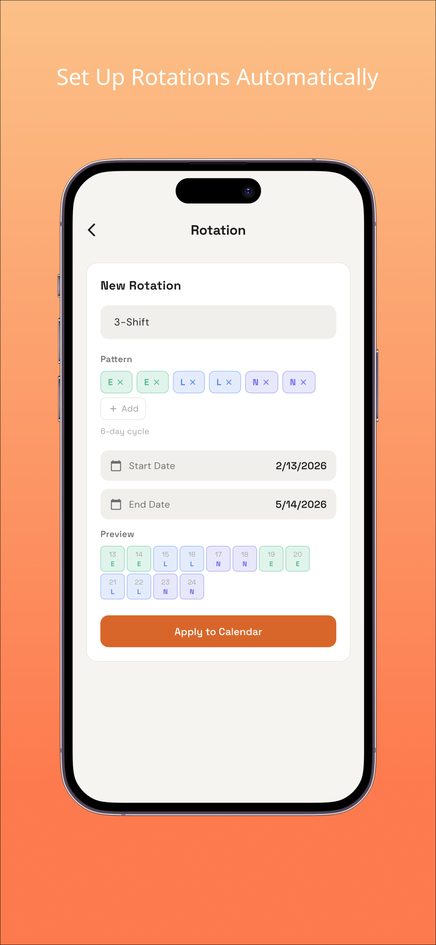
- In Settings, open Rotation, give the rotation a name and build the cycle from your shift types and days off, for example Day, Day, Night, Night, Off, Off, Off, Off.
- Choose a start date that matches the first day of the cycle on your official rota, and an end date.
- Check the preview, then apply the rotation to the calendar.
- For one-off changes, tap a date to change its shift or add a memo, or use paint mode and the eraser. Edits stay unless you reapply the rotation.
- Check the summary bar for the month's work days, hours and estimated income, and use Share as Image to send the month to family.
The iPhone and Android apps add a statistics screen by shift type, CSV export and backup and restore.
Frequently asked questions
What is the difference between 2-2-3 and 4 on 4 off?
2-2-3 repeats every 14 days and gives every other weekend off. 4 on 4 off repeats every 8 days, so the days off move through the week. Both average 42 hours a week with 12-hour shifts.
How many crews does a 24/7 operation need on 12-hour shifts?
Four crews is the usual answer for patterns like 2-2-3, 4 on 4 off and DuPont: two crews are working on any given day (one on days, one on nights) while two are off.
Why does my average come out at 42 hours rather than 40?
A 24/7 site needs 168 hours of cover each week. Split between four crews, that is 42 hours each. Overtime rules for those extra hours depend on your contract and local law.
Can I change one day without breaking the rotation?
Yes. In Shift Calendar, tap the date and change it. The rotation fills dates once, so your edit stays unless you apply the rotation again over that range.
Where is my calendar stored?
In the web version, only in your browser on that device, with no account. Clearing browser data removes it, and it does not sync with the phone apps.