How to Keep a Blood Sugar Log: What to Record and How to Stay Consistent
If your doctor or diabetes care team has asked you to check your blood sugar at home, they will usually want to see the readings as well. A meter remembers some recent results, but a log you keep yourself adds the context that makes the numbers useful: when the reading was taken, how it related to meals, and anything unusual about that day.
This guide covers what to record for each reading, how to make logging a habit, how to bring your log to appointments, and the honest pros and cons of paper logbooks, spreadsheets and apps. It ends with how to keep the log in SugarLog.
Before you start
This article is about record keeping only. It is not medical advice, and it does not suggest when to test, how often, or what any number should be. Your doctor or care team will tell you when to check, which ranges apply to you and what to do about a reading. Follow their instructions, and do not change medication or treatment based on an article or an app. If you feel unwell or think you have an emergency, contact your local emergency services.
What to record for each reading
A useful log entry has a few parts. Write them down every time, even when the reading seems unremarkable:
- The value, exactly as the meter shows it.
- The unit: mg/dL or mmol/L. Most meters use one or the other depending on the country; write the one yours shows and use it consistently.
- The date and the time of the reading.
- The timing relative to meals, such as before breakfast, after lunch or before bed. Your care team may ask for readings at particular times, so labelling them clearly matters.
- A short note for anything that might help explain the number later: a missed meal, unusual exercise, illness, a late night, or a question for your next appointment.
If your care team has asked you to record other things, such as medication doses, food or symptoms, include those in the way they have asked.
How to stay consistent
The most common problem with a glucose log is gaps. A few habits make it easier:
- Log immediately. Write the reading down while the meter is still in your hand. Numbers remembered later are easily wrong.
- Keep the log with the meter, whether that is a notebook in the same case or an app on the phone you always carry.
- Use the same timing labels every time, so before-breakfast readings are always grouped together.
- Set reminders for the times your care team has asked you to check, if that helps you remember.
- Do not skip or delete readings that look surprising. Those are often the ones your care team most wants to see.
- If you miss a reading, leave it out rather than guessing a number.
Reviewing your log with your care team
A log is most valuable when you go through it with the people looking after your health. Before an appointment:
- Bring the log, or the phone with the app, and your meter.
- Note any questions next to the relevant readings so you remember to ask them.
- Be ready to describe what was different on days with unusual numbers, using your notes.
- Ask how they would like readings presented in future: a list, averages for each time of day, or a chart.
Summaries such as averages or the highest and lowest readings over a period can help a conversation, but leave interpretation to your doctor or nurse. They know which ranges and patterns matter for you.
Paper logbook, spreadsheet or app?
Paper logbook or printable log sheet
Many clinics hand out paper logbooks, and printable log sheets are widely available. Paper needs no battery, is easy to hand to a nurse, and works for anyone. The downsides are that you have to calculate any averages yourself, it is easy to forget at home, and looking back over months means flipping pages.
Spreadsheet
A spreadsheet can calculate averages and draw charts automatically and is easy to print. It is awkward to fill in on a phone straight after a reading, so entries tend to be delayed.
Logging app
An app lives on the phone you already carry, can remind you to check, and draws charts and averages for you. Some apps connect to meters or sensors; others, including SugarLog, use manual entry, which works with any meter but means typing each number. Whatever you use, make sure you can show the readings to your care team in a way they find useful.
How to keep a blood sugar log in SugarLog
SugarLog is a simple personal log; it records and summarizes, and does not judge readings against any target. To use it:
- Open Settings and choose mg/dL or mmol/L under Unit, matching your meter.
- After each reading, tap Add Record. Enter the glucose value, check the date and time, and choose the timing: before or after breakfast, lunch or dinner, before bed, or other.
- Add a memo for anything worth remembering, then tap Save.
- On Home, glance at the quick summary for the past week or month and your most recent records.
- Use the Chart tab to view 1 day, 1 week, 1 month, 3 months or all time, with points coloured by timing.
- Open Statistics for the average, highest, lowest, standard deviation and count, overall and for each timing, to show at your appointment.
- In History, search memos, filter by timing, and edit or delete a record entered by mistake.
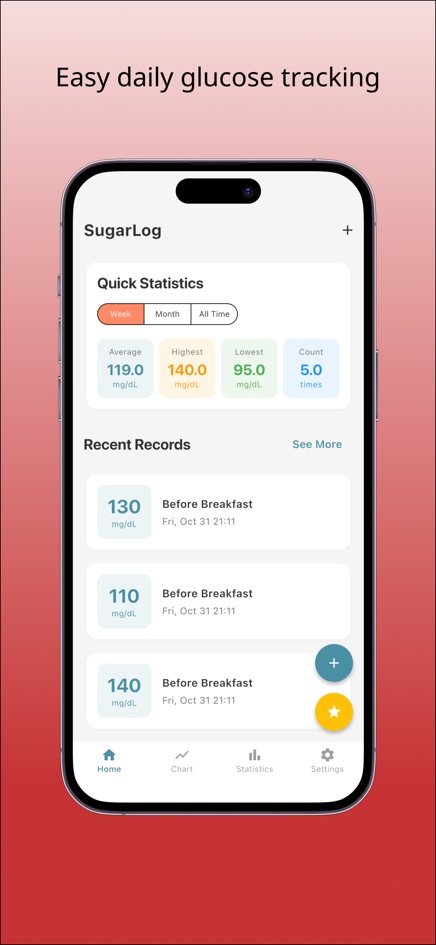
The iPhone and Android apps add reminders on the days and times you choose. If your meter and your care team use different units, see how to convert mg/dL to mmol/L.
Frequently asked questions
How often should I check my blood sugar?
That depends on your situation and is for your doctor or care team to decide. Follow the schedule they give you, and use your log to record whatever they ask for.
What should I write in the notes?
Anything that may help explain a reading later: meals, exercise, illness, stress, sleep, or a question for your next appointment. Keep it short so you actually write it.
Does SugarLog tell me if a reading is high or low?
No. It records your numbers and calculates summaries such as averages, but it does not compare readings with any target. Ask your care team which ranges apply to you.
Can SugarLog connect to my meter or sensor?
No. Readings are typed in by hand, which means it works with any meter.
Where is my data stored?
On your device. The web version keeps readings in your browser, with no account and nothing uploaded. Clearing browser data removes them, and the web and phone apps do not sync with each other.